When Something Breaks, Your CMDB Should Already Know (ServiceNow How-To)
By Chris Gatlin, Founder, GMG Technology (gmgtechllc.com)
Brandon Wilson asked me to do "the boring one."
An outbound integration where the OAuth token expires and the queue quietly backs up while nobody notices.
So I built it. On my own ServiceNow dev instance, I let a token expire on purpose and let the CMDB and Event Management do the rest. No one triaged it. No one looked up the owner. The CMDB already knew.
Watch the model
Click a step, or let it auto-play. Each step lights the next part of the model.
Watch the model
Event Management
Which CI is this event about?
CSDM
What service depends on that CI?
Alert Management
Should this become an incident?
ITSM
Who is the caller, which group?
Paging
Whose phone?
CMDB foundation
Integration CI
Owner ·Support group ·Service (CSDM)
The CMDB drives the whole shebang.
How the demo grew
The original plan was small: show a credential expiring and a queue quietly backing up. Catch the failure, raise a flag, done.
But answering Brandon's ask honestly meant answering the next questions too. What broke? Who owns it? What depends on it? Who gets called, and how do they say "I've got it"?
So the demo morphed. It became a walk through how CMDB, CSDM, Event Management, Alert Management, ITSM and paging work together when something goes wrong, stage by stage, from the failure through the acknowledgement. The automation stops at the ACK. A person still resolves the incident.
Here's how it works, step by step.
Why the CMDB is the foundation
Every module in this demo asks the CMDB a question.
- Event Management asks: which CI is this event about?
- CSDM asks: what service depends on that CI?
- Alert Management asks: what alert does that CI have, and should it become an incident?
- ITSM asks: who is the caller, and which group gets the incident?
- Paging asks: whose phone do I call?
Each answer comes from the same CI record. The platform only works this way when the pieces are connected, and the CMDB is what connects them.
If the CI is missing, the event has nothing to bind to. If the owner is stale, the wrong person gets paged. If the support group is wrong, the incident lands in the wrong queue and waits. Every stage after the failure gets slower, because someone has to go look up what the CMDB should have already known.
That's why I think a great CMDB is the foundation for fast MTTR. Not a nice-to-have you clean up later. The thing everything else reads from.
What a proper CMDB looks like here
For this pattern to work, the CMDB has to be more than a list of servers. It has to be the place every other module trusts.
That means:
- Integrations are CIs, not just endpoints in a spreadsheet.
- Every integration CI has a real owner and a real support group, kept current.
- The services that depend on those CIs are linked (CSDM), so you can see the blast radius.
- When something fails, the event lands on that CI, so Event Management, Alert Management and ITSM all read the same record.
If the CMDB is thin or stale, the rest of the platform still runs. It just runs wrong. The wrong person gets paged. The incident sits in the wrong queue. Someone still has to go look up what the CI should have already known.
A proper CMDB is what makes the incident path automatic from failure through acknowledgement. Without it, you are back to a person reading a queue.
The pattern this demo follows
Brandon's boring ask turned into a demo of how the modules are meant to connect. None of it is a new idea. ServiceNow's own documentation describes this pattern. See their Event Management configuration preferences, Binding alerts to CIs, and Alert management rules pages on docs.servicenow.com, and this demo follows it with a real failure on a small scale. This is my paraphrase of the docs, not an official ServiceNow reference design or endorsement.
What the docs recommend
- Fill in the event fields. The Event Management best practices say to populate Source, Node, Type, Resource and Metric Name on every event, so Event Management can work with it.
- Bind alerts to CIs. Use Node, and optionally a CI identifiers JSON, so the alert lands on the right CI. The docs say to manage that binding through event rules, not business rules.
- Use a message key for deduplication, so repeat events update one alert instead of creating many.
- Why binding matters. Per the docs, tying an alert to the relevant CIs gives teams the context to find the problem faster. Without that binding, resolution takes longer.
- Let Alert Management Rules do the response. Rules can automate actions based on filters, including opening an incident through the out-of-box Create Incident subflow.
How this demo maps to it
- The sync failure raises an event (
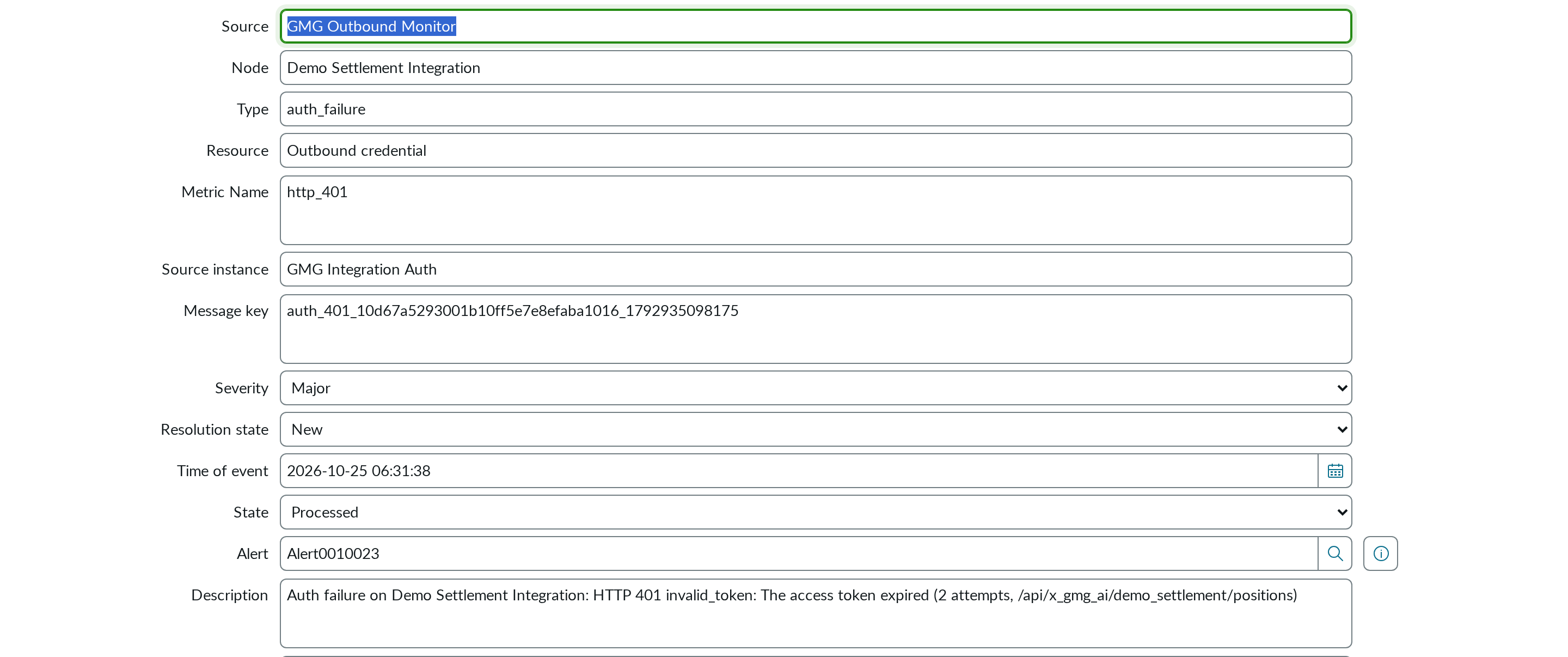
em_event) withcmdb_ciand node set to Demo Settlement Integration. That's the CI binding. The same event also fills Source, Type, Resource, Metric Name and a message key, the fields the docs call out for binding and deduplication. - Event Management raises the alert on that CI.
- An Alert Management Rule runs the Create Incident subflow to open the incident.
- The CI's owner and support group fill in the ITSM fields: caller and assignment group.
- The CSDM dependency shows which service is affected.
- The page goes to the owner listed in the CMDB.
In this demo the sync sets the CI directly on the event because it already knows which CI it is calling. In a real shop where the source only knows a host or endpoint, you'd let event rules bind on Node or the CI identifiers, the way the docs describe.
Step 1: Make the integration a CI
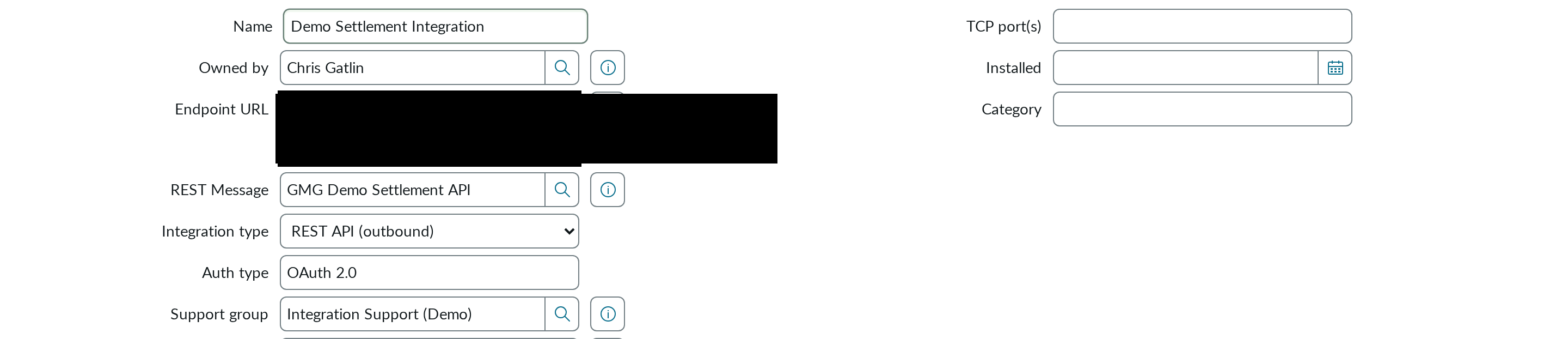
The outbound integration lives in the CMDB as a CI called Demo Settlement Integration. It holds the owner (me) and the support group.
The same CI has a reference field to the REST Message record. Endpoint URL and auth are on the form too. The reference is the link to the REST Message itself, not just those two. On this demo CI the field points at REST Message GMG Demo Settlement API.
Everything later in the chain reads from this record. If the owner is wrong here, the wrong person gets paged. Keep it clean.
Step 2: Show what depends on it
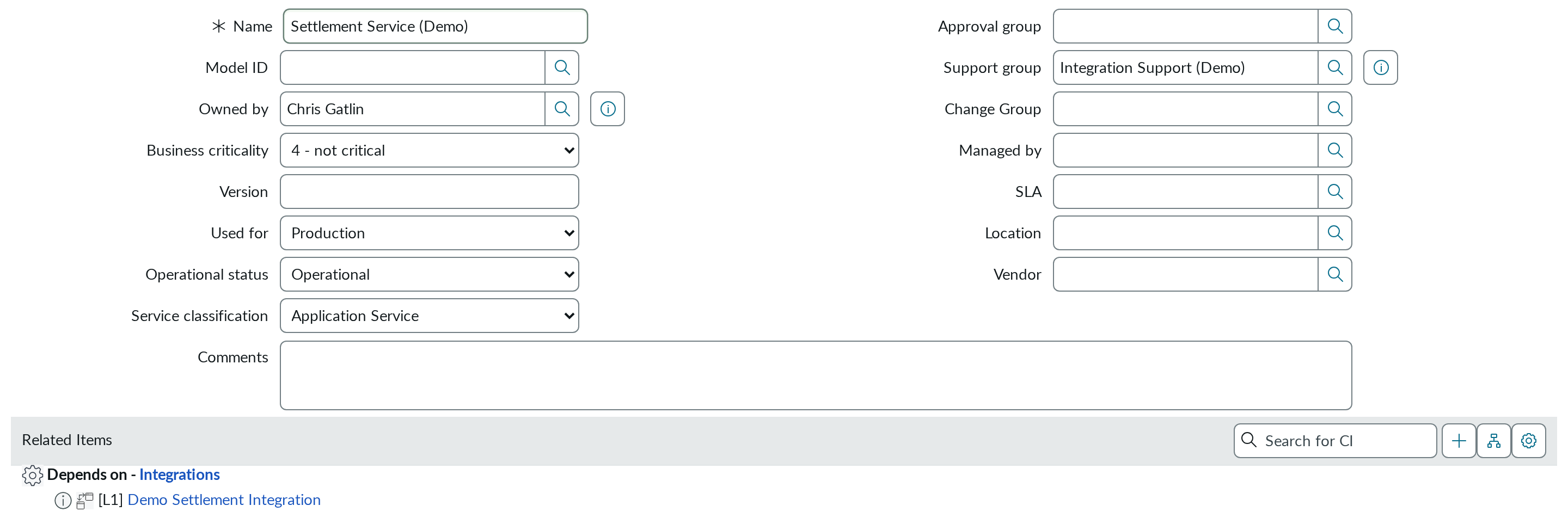
A CSDM service instance depends on the CI. Now when the integration breaks, you can see the blast radius instead of guessing.
Step 3: Let the token expire
A scripted sync call goes out to a demo endpoint. The token is expired, so it gets a 401.
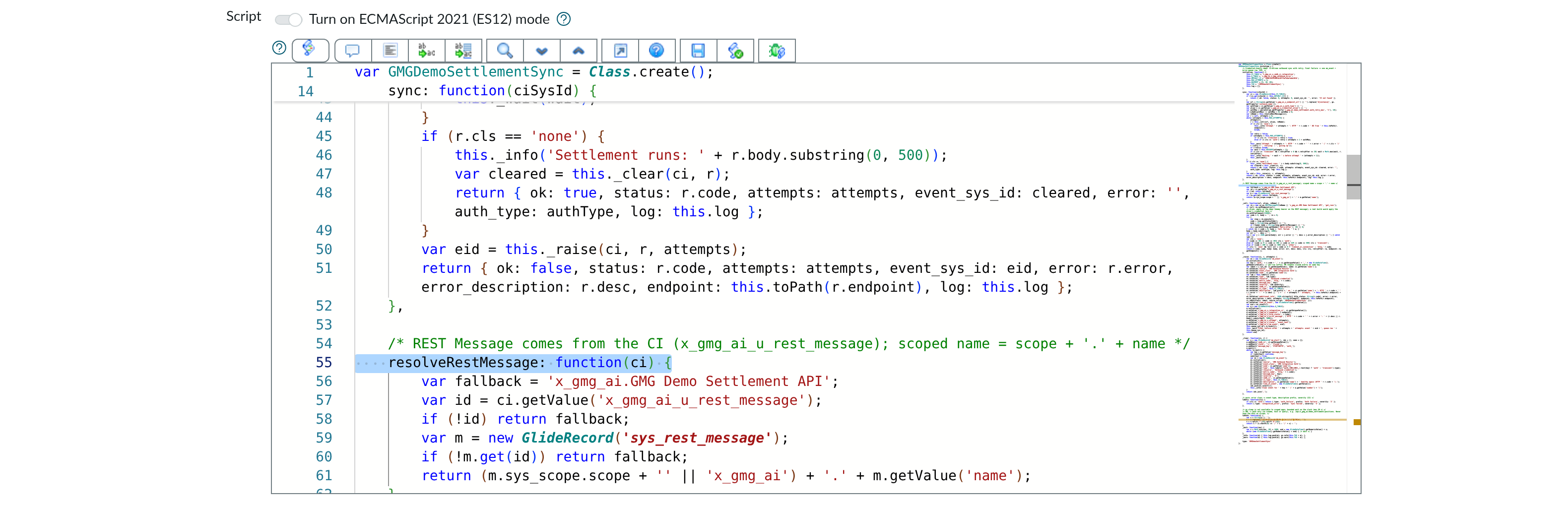
Before it retries, the sync reads which REST Message to call from the CI. resolveRestMessage reads x_gmg_ai_u_rest_message, looks up sys_rest_message, and returns the scoped name. If that reference is empty, it falls back to x_gmg_ai.GMG Demo Settlement API.
resolveRestMessage: function(ci) {
    var fallback = 'x_gmg_ai.GMG Demo Settlement API';
    var id = ci.getValue('x_gmg_ai_u_rest_message');
    if (!id) return fallback;
    var m = new GlideRecord('sys_rest_message');
    if (!m.get(id)) return fallback;
    return (m.sys_scope.scope + '' || 'x_gmg_ai') + '.' + m.getValue('name');
},
_call: function(url, alias, rmName) {
    var rm = new sn_ws.RESTMessageV2(rmName || 'x_gmg_ai.GMG Demo Settlement API', 'get_runs');
    if (url) rm.setEndpoint(url);
    // …
}
var url = String(ci.getValue('x_gmg_ai_u_endpoint_url') || '').replace('${instance}', gs.getProperty('instance_name'));
var authMax = parseInt(gs.getProperty('x_gmg_ai.demo_settlement.auth_retry_max', '1'), 10);
var rmName = this.resolveRestMessage(ci); // CI → sys_rest_message
var r = null, attempts = 0;
while (attempts < this.MAX_ATTEMPTS) {
attempts++;
r = this._call(url, alias, rmName);
if (r.cls == 'none') break;
var retry = false;
if (attempts < this.MAX_ATTEMPTS) {
if (r.cls == 'transient') retry = true;
else if (r.cls == 'auth') retry = attempts < 1 + authMax;
}
if (!retry) break;
var wait = this.BACKOFF[attempts - 1];
if (r.cls == 'transient' && r.retryAfter > 0 && r.retryAfter <= 20) wait = Math.max(wait, r.retryAfter);
this._wait(wait);
}
It retries once, then fails. I don't keep hammering an auth failure, because retrying won't fix a dead credential. Timeouts and 5xx errors are different. Those get up to 3 attempts with backoff.
When it fails, the script doesn't just log and move on. It creates an event (em_event) on the CI.
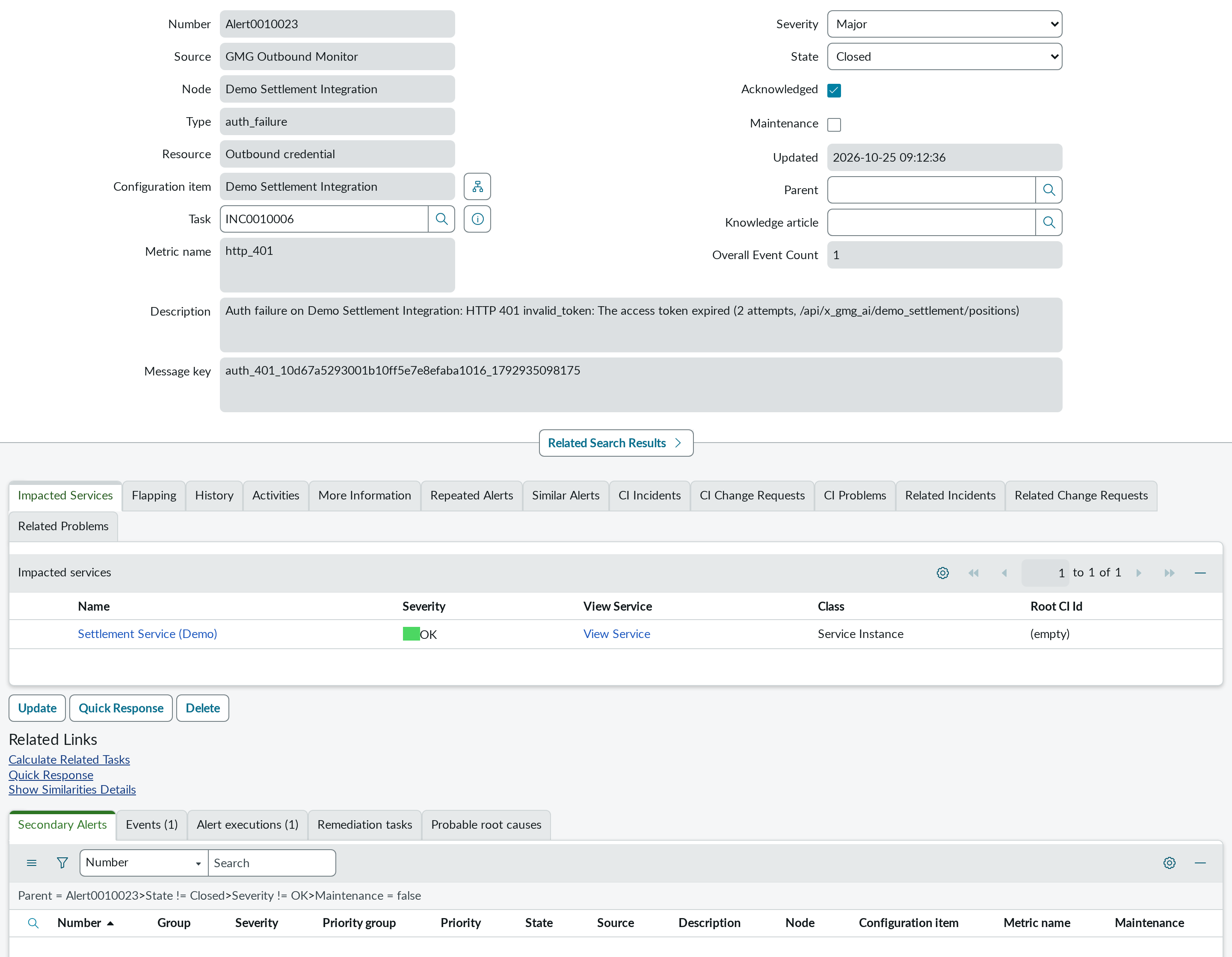
Step 4: Event Management raises one alert
Event Management picks up the event and raises one alert on the CI.
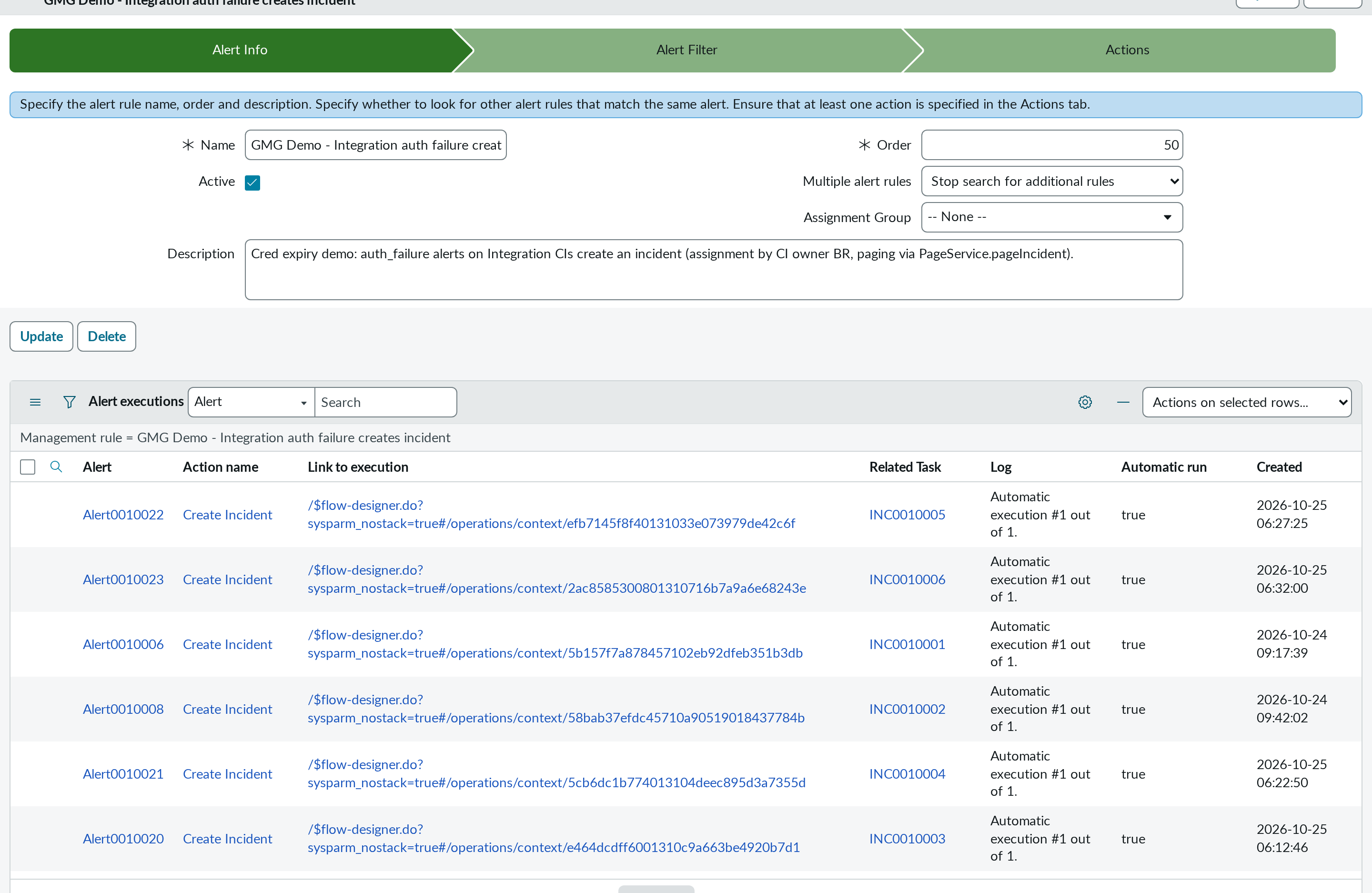
Step 5: An Alert Management Rule opens the incident
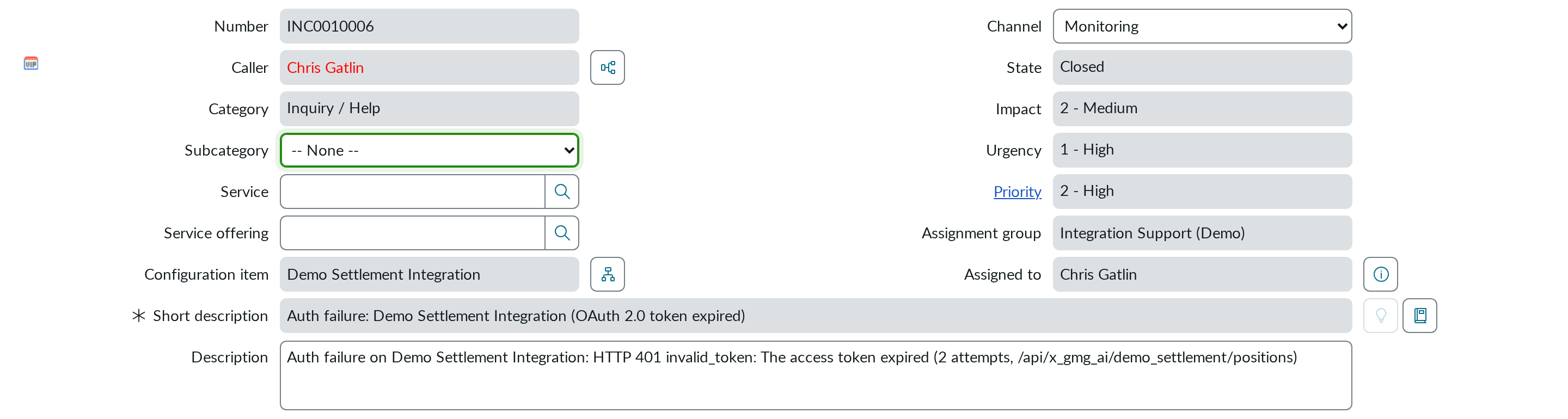
An Alert Management Rule, using the out-of-box Create Incident subflow, opens the incident. A small GMG rule fills in the caller, impact and urgency from the CMDB.
The CI's owner becomes the caller and its support group gets the incident. Nobody typed either one.
Step 6: The page
Then my phone rings.
A Twilio text arrives telling me I'm listed in the CMDB as the owner, what errors were logged, and the incident number. My Vapi voice agent calls with the same information.
The ask is simple: tap the link or reply ACK.
Use whatever paging or SMS service you already have. Twilio and Vapi are just what I used.
Step 7: The acknowledgement
When I acknowledge (tap the link and hit Acknowledge, or reply ACK), three things happen in ServiceNow.
A work note is logged in Activities.

The incident is reassigned to me.
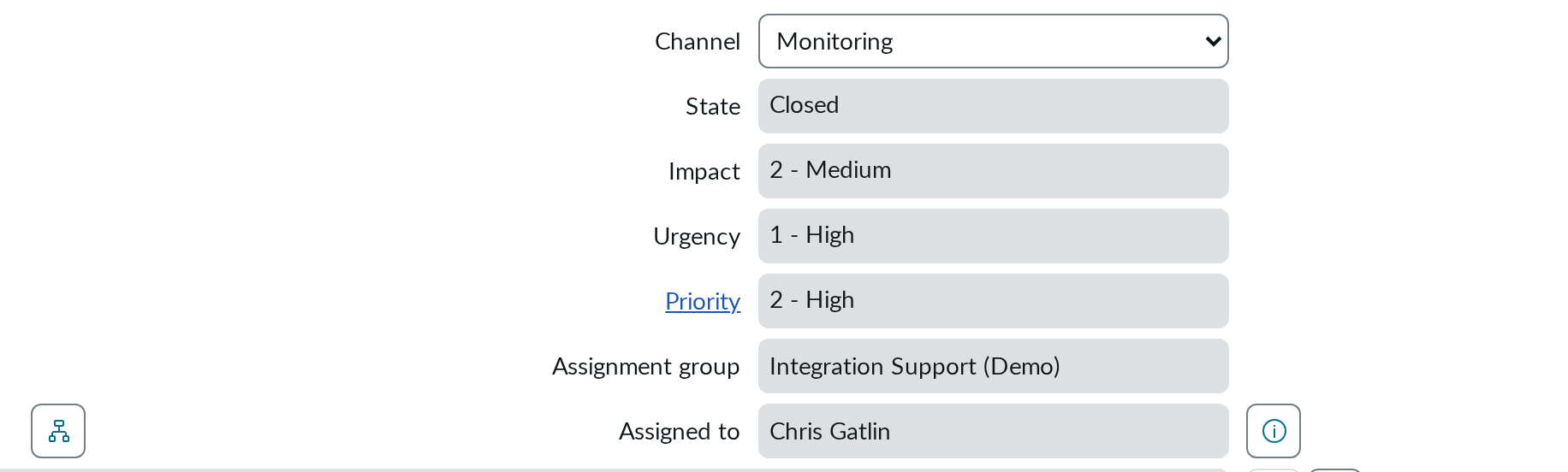
The alert is acknowledged.

What this demo is and isn't
It is a real demo with real code, running against a simulated endpoint.
The automation runs through the acknowledgement. A person still resolves the incident. I didn't automate the fix, and I don't think you should start there either.
It's one alert per run. I'm not claiming any roll-up or correlation behavior here.
The paging is my own Twilio and Vapi setup. It isn't ServiceNow On-Call or Notify.
Adapt it to your stack
You don't need my exact pieces. The pattern is what matters:
- Put your integrations in the CMDB as CIs with a real owner and support group.
- Link them to the services that depend on them.
- When an integration fails, create an event on the CI instead of just writing a log line.
- Let Event Management raise the alert and an Alert Management Rule open the incident.
- Page the owner with whatever you already use for SMS or voice.
- Give them a one-tap way to acknowledge that writes back to the incident and the alert.
Retry auth failures once. Give timeouts and 5xx errors a few attempts with backoff. Don't page someone for a blip.
Your turn
How does your team find out a credential died?
The CMDB drives the whole shebang.
This blog doesn't have comments. Tell me on LinkedIn.
Disclaimer: The API in this demo is a demo endpoint with a demo credential, running on a dev instance. Paging runs on my own Twilio and Vapi setup, not ServiceNow On-Call or Notify. I'm not affiliated with ServiceNow, Twilio or Vapi. If you page anyone besides yourself, get their consent first and tell them it's an AI call.